
How to Use Google Search to Develop Blog Content
Did you know that you can extract a real content strategy directly from Google's search results and for free?
By systematically looking at what Google surfaces like People Also Ask questions, AI-generated summaries, and organic result patterns you can identify gaps and angles worth writing about. One keyword search can give you 4–6 blog post ideas conservatively.
This guide uses "leadership development" as an example, but the method works for any assessment-related or executive coaching keyword you're targeting.
Step 1: Search Your Keyword and Observe the Results Page
What to Do
Open your browser of choice and search: "leadership development"
Don't click any links yet. Instead, look over the full page layout.
What You'll See
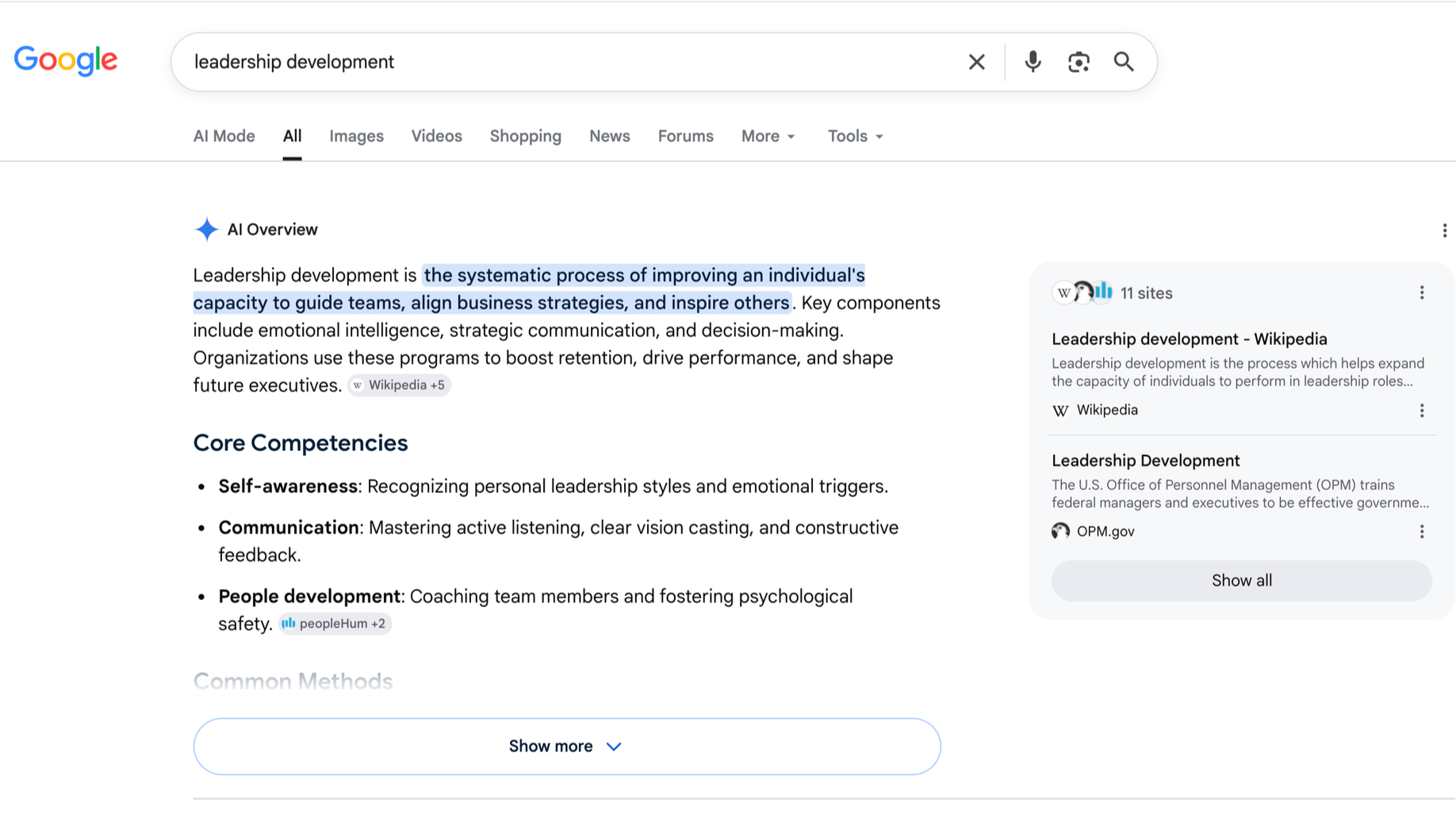
Google shows several layers of “zero-click” results on this page:
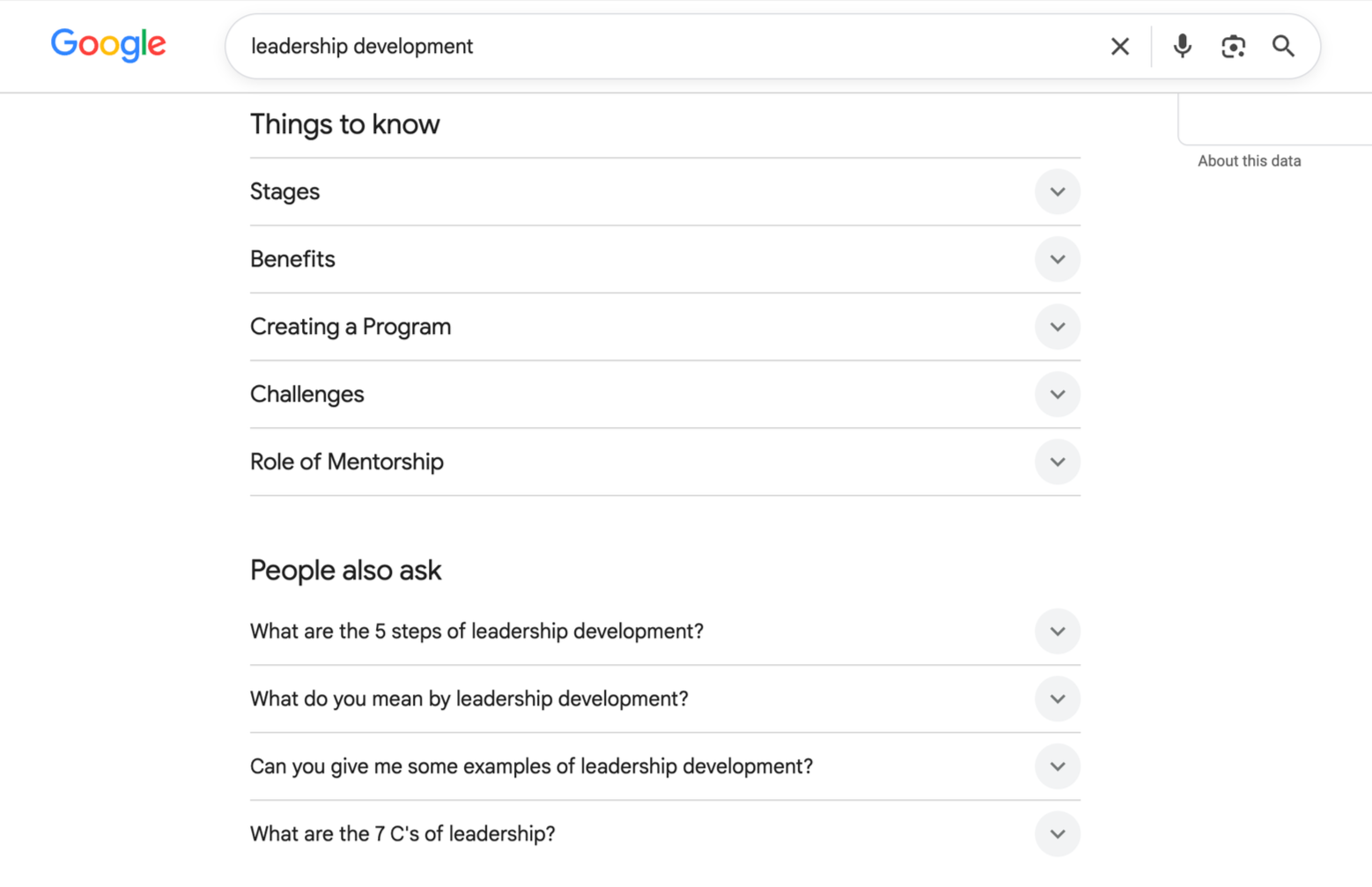
People Also Ask — 4–6 expandable questions that real searchers are asking
AI Overview (if shown) — Google's AI-generated summary of the topic
Knowledge panel — key facts in a sidebar on the right
Featured snippet — a single answer Google pulled out as most relevant
Organic results — the typical ranked list of websites below
Why This Matters
This free intel reveals what actual searchers care about—their questions, pain points, and confusions. Google doesn't show random content; it surfaces what people are searching for and what answers already exist. That's your roadmap for what to write and where gaps exist.
Step 2: Extract People Also Ask Questions
What to Do
Find the People Also Ask box on your search results page
Click each question to expand it and see Google's answer
Copy the question wording
Cite which website Google featured as the answer source
Example: "Leadership Development" Search
When you search this keyword, you'll typically see questions like:
What is the difference between leadership development and management training?
How long does leadership development take?
What are the key competencies in leadership development?
Can you develop leadership skills online?
These four questions, right there, are your first four blog post topics. Each question maps to one piece of content you can write.
Step 3: Review the AI Overview
What to Do
Look for the AI Overview section (near the top, marked as Google's AI-generated summary).
What to Look For
Is the summary comprehensive?
Which sources did Google cite?
What aspects of the topic does it cover?
What are the gaps or missing angles?
How to Use It
If the overview is thin or basic: There's a clear content gap. You can write something more authoritative and detailed.
If the overview is comprehensive: Your blog post should go deeper. Add research, examples, or a perspective the overview doesn't cover.
Either way: You now know what Google considers the core facts about your topic. Start there, then differentiate.
Step 4: Analyze the Organic Results
What to Do
Scan the top 10 ranked results. As you review them, categorize what you see:
Are most results definitions or explanations?
Are there how-to guides or practical advice?
Do you see case studies or examples?
Are the results from recent publications or older articles?
What This Tells You
If all results are definitions: A how-to guide or practical deep-dive is an opportunity
If top results look outdated: You can write something current that ranks better
If content is thin: A more thorough, well-researched post has room to win
If there's a missing perspective: (e.g., research-backed, practical, skeptical) That's your competitive angle
This takes a few minutes and immediately reveals where the content weakness is.
Step 5: Build Your Content Calendar from the Questions
How That Works
One search gives you 4–6 questions. Each question becomes one blog post.
Quick marketing math: one keyword search = one month of content ideas.
From "Leadership Development" to Blog Posts
The People Also Ask questions become your titles:
People Also Ask Question → Your Blog Post
"What is the difference between leadership development and management training?" → "Leadership Development vs. Management Training: What's the Real Difference?"
"How long does leadership development take?"
→ "How Long Does Leadership Development Actually Take? A Realistic Timeline""What are the key competencies in leadership development?"
→ "5 Core Leadership Competencies Employers Actually Measure""Can you develop leadership skills online?"
→ "Can You Really Develop Leadership Skills Online? What Research Shows"
There's your editorial plan for the next 6–8 weeks. Write one, publish it, move to the next. Once you've published 4–5 posts on "leadership development," search the keyword again. Google's People Also Ask will have shifted, giving you a fresh batch of post ideas.
Step 6: Stay Educational; Avoid Sales Messaging
What Works
When people search "leadership development," they're looking to learn, not to prep for an assessment. Your content should reflect that:
"What organizations look for in leaders"
"Why leadership development matters in modern business"
"How leadership skills differ across industries and roles"
What Doesn't Work (Avoid These)
"How to score well on a leadership assessment"
"How to interpret your assessment results"
Anything framed as test preparation or results coaching
This distinction matters. Educational content ranks better, attracts the right audience, and keeps you on-brand as a neutral resource—not a test-prep service. It's the difference between being found by people exploring solutions and being found by people already locked into one.
Step 7: Expand to Related Keywords
Once you've published 4–5 posts on "leadership development," search related terms to find your next content batch:
"Leadership coaching"
"Leadership styles" or "types of leaders"
"Developing leadership skills"
"Executive coaching"
"What makes a good leader"
Repeat the same process for each keyword: extract People Also Ask questions, scan the organic results, identify gaps. You're building a topical cluster around leadership, which signals to search engines that your site has depth on this subject. Clusters of related posts rank better than standalone articles.
Step 8: Publish and Track
Publishing Rhythm
Publish one blog post every 1–2 weeks
Try to post related content within 2–3 weeks of each other so the search engines can understand the connection
Link between related posts internally—if you write about "leadership development," link to your "leadership vs. management" post and vice versa
Track What Works (and What Doesn’t)
Use Google Search Console (free, thanks Google) to monitor:
Which posts are getting clicks from search
Which keywords they're ranking for
Which posts are underperforming (consider for an update)
After 2–3 months of publishing, you'll have real data on what resonates. Use that to inform your next batch of topics.
Wash and Repeat
Every 2–3 months, search your core keywords again. Google's People Also Ask shifts as search trends evolve. New questions emerge, old ones disappear. Keep the process fresh and your content calendar will stay relevant.
Quick Start Checklist
Search your target keyword on Google
Screenshot or note the 4–6 People Also Ask questions
Review the AI Overview for gaps
Scan the top 10 organic results for competitive patterns
Write your first blog post answering one People Also Ask question
Publish and link to it
Schedule the next 3 posts based on the remaining questions
In 2–3 months, search the keyword again and repeat
Try it today: Search "leadership development," spend 10 minutes observing the page, and write down the questions. You've already got your first month of content ideas.
Ready to Scale Your Content Strategy?
Building a consistent blog takes time, research, writing, optimization, and publishing.
I work with assessment distributors to turn this process into a repeatable system. I help you:
Identify high-intent keywords your distributor network should own
Build content calendars based on real search intelligence (not guesswork)
Create educational, SEO-friendly blog posts that position your partners as trusted experts
Establish topical authority that compounds over time—each post makes the next one rank better
Whether you need a complete content strategy overhaul, monthly blog posts, or help scaling what you're already doing, I work with distributors who are serious about organic reach.
Let's talk about what's realistic for your timeline and budget.
Reach out, and we'll discuss how to build a content engine that actually drives leads.